Changelog
A running record of what's shipped across the TUMO platform — newest first. For deeper detail, follow the linked knowledge base articles.
November 2026
Coach Tool: Student View & Filtering Improvements
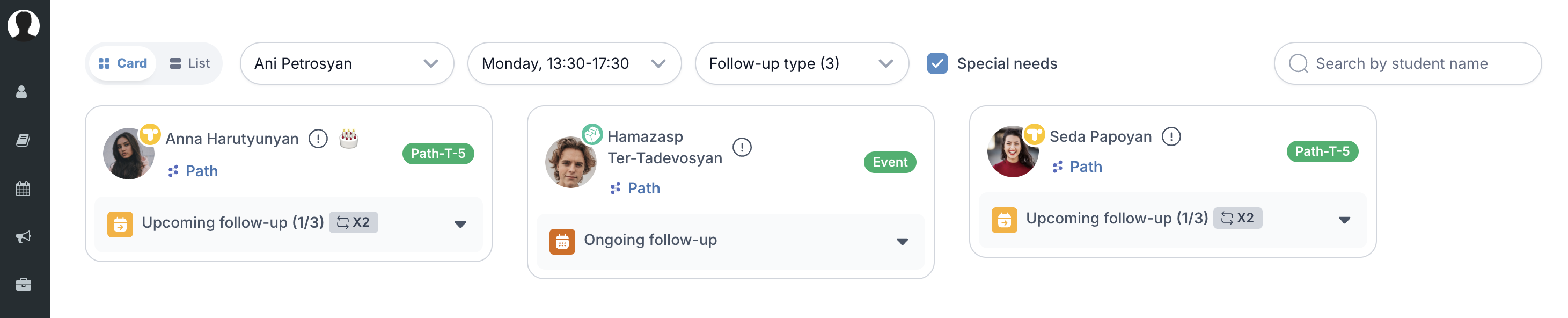
The Coach Tool now provides better student visibility, including students without follow-up tasks, easier filtering by Special Needs status, clearer phase information with TUMO start dates, and a cleaner Card View.
-
Card View: Students with no follow-up tasks are now shown in Card View too, with a clear indication that they have no follow-up actions, so coaches can easily spot them. Ordering stays the same.
-
Phase Indicator: Hovering over a student's phase letter now shows the date they started at TUMO, in both Card View and List View.
-
Card View: Removed the small creation-date indicator dots from student cards to reduce visual clutter.
-
Special Needs Filter: Coaches can now filter the student list by Special Needs status in both List View and Card View, eliminating the need to scan the full list for the Special Needs icon. In Card View, depending on the screen size, it may appear directly in the view or under the More dropdown alongside Follow-up Tasks. The filter can be cleared and combined with any other active filters.
-
Card View: Previously, if a student had completed all the workshop prerequisites, the Upcoming Workshop task was automatically closed. Now, regardless of whether the student has completed the prerequisites, the task remains open until the course start date.
-
Card View: "Repeated Workshop" icon has been added to the Card View for both Upcoming and Ongoing workshops, indicating how many times a student has participated in the same workshop.

October 2026
Security update: PHP vulnerabilities
On October 21, PHP, the programming language behind many of our platforms and websites,
announced two serious security flaws, CVE-2026-109618 and CVE-2026-109619.
How we addressed it
TUMO World, T360 and Path.
The platform has been updated to a safe version of PHP, from 8.3.30 to 8.3.36, for all centers.
TUMO websites.
49 websites and services, including
tumo.org
and center WordPress sites, have been updated to a safe version of PHP. One more service, t4at,
has also been updated.
SiteGround-hosted websites and services upgraded to PHP 8.4.27; t4at on Azure upgraded from PHP
8.3.36 to 8.4.27.
A third flaw. On October 23, PHP announced another security flaw, CVE-2026-115560, this one related to how websites store login session data. It only affects websites that use a specific session setting. Our team checked and confirmed that TUMO platforms don’t use that setting, so they are not affected. PHP hasn’t released a fix yet, because it considers this flaw unlikely to be used in practice. As an extra precaution, a small settings change recommended by PHP has been made.
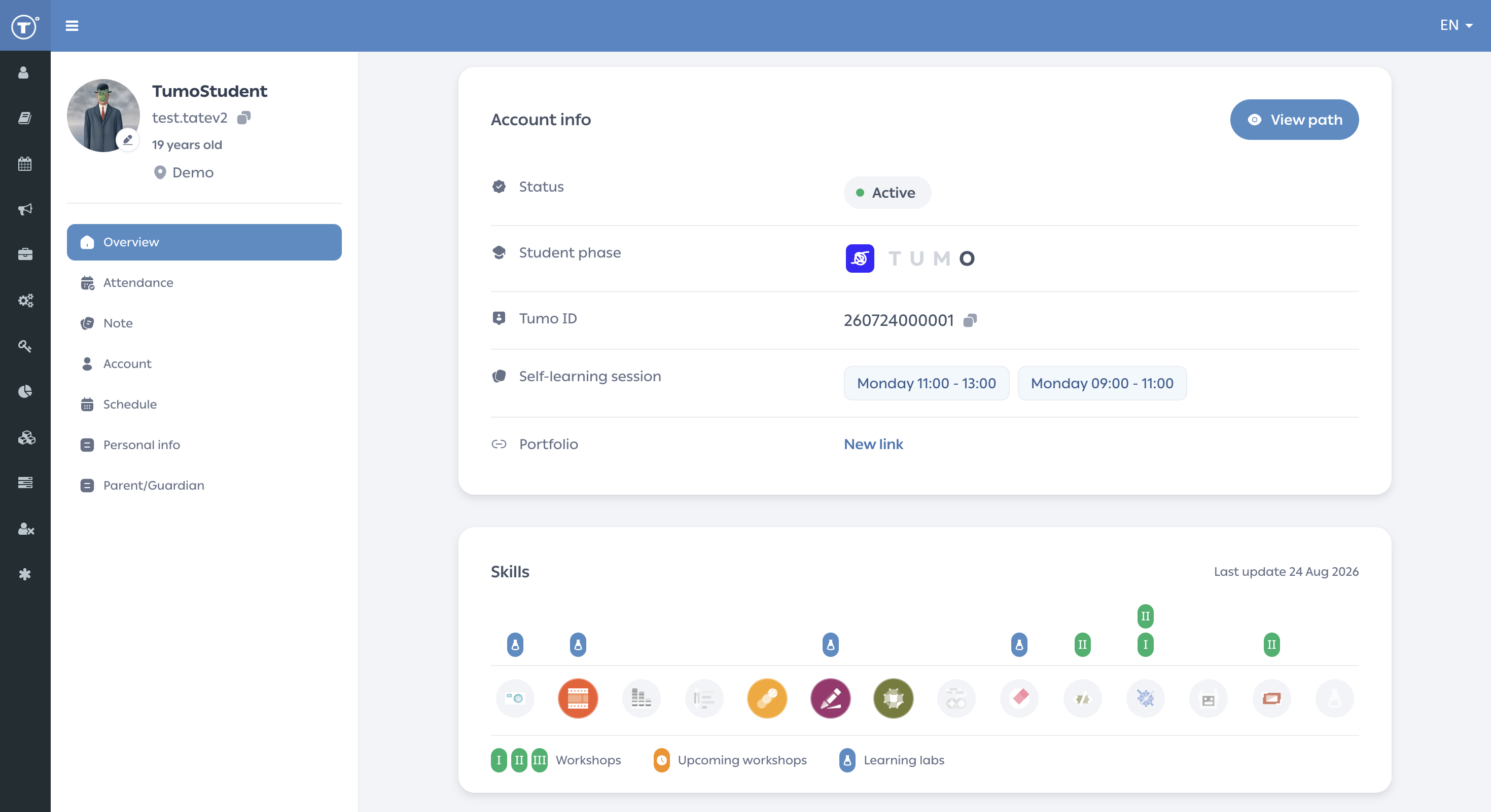
Student Profile: Overview page
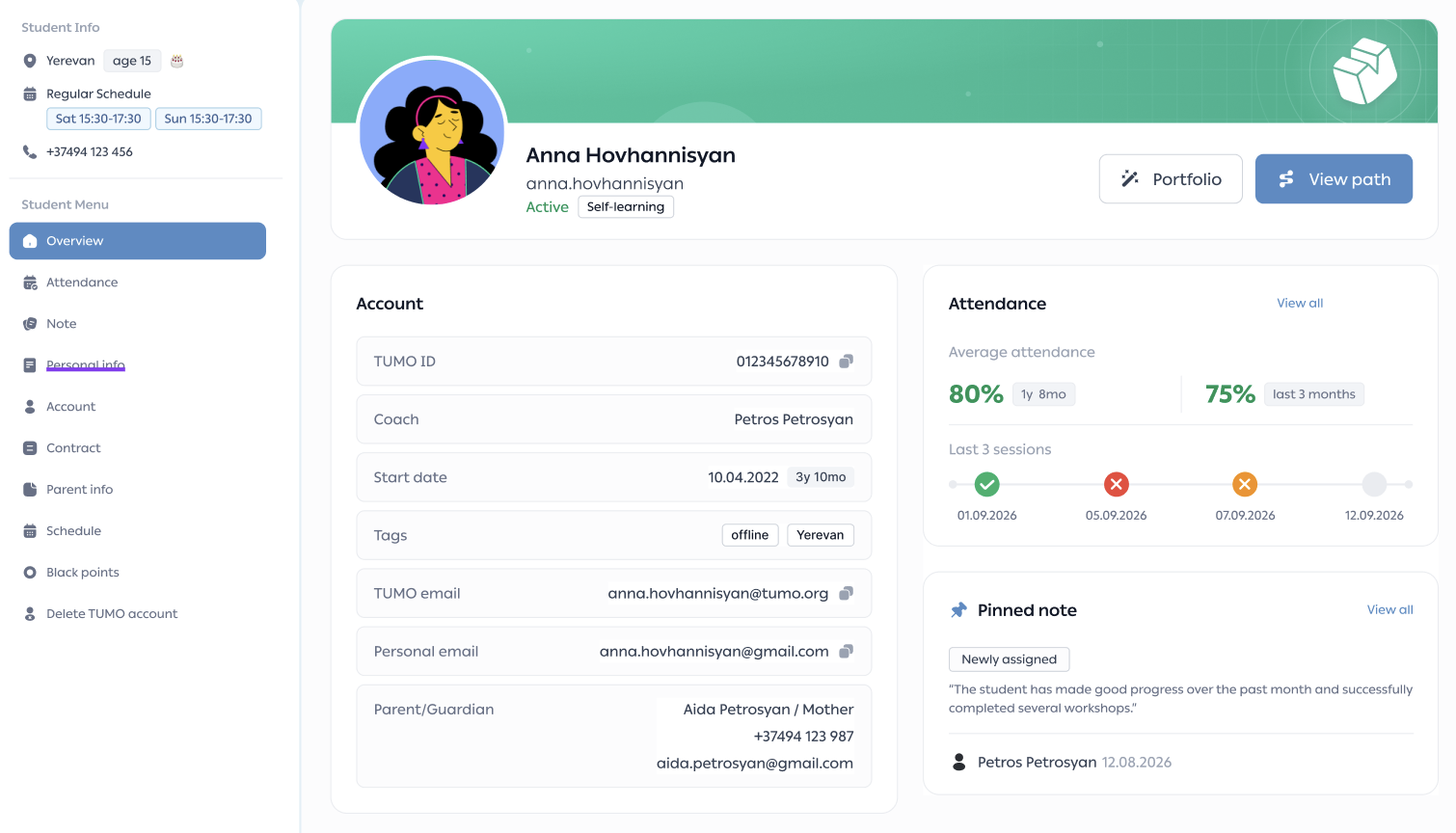
The student left menu, the Overview header and the Account section have been redesigned, and new Attendance and Pinned note widgets have been added, so that a student’s key details are visible without leaving the page.
- The left menu shows the student’s location, age, regular schedule and phone number on every profile page.
- When you scroll down the Overview page, a compact student header appears in the left menu.
- The header banner matches the student’s T.U.M.O. phase and shows their name, username, current engagement status, and the Portfolio and View path buttons.
- The Account card groups TUMO ID, coach, start date, tags, emails and parents/guardians.
- The Attendance widget shows average attendance (overall and last 3 months) and the last 3 sessions.
- The Pinned note widget shows the pinned note with its tag, author and date.
Student Profile: Attendance
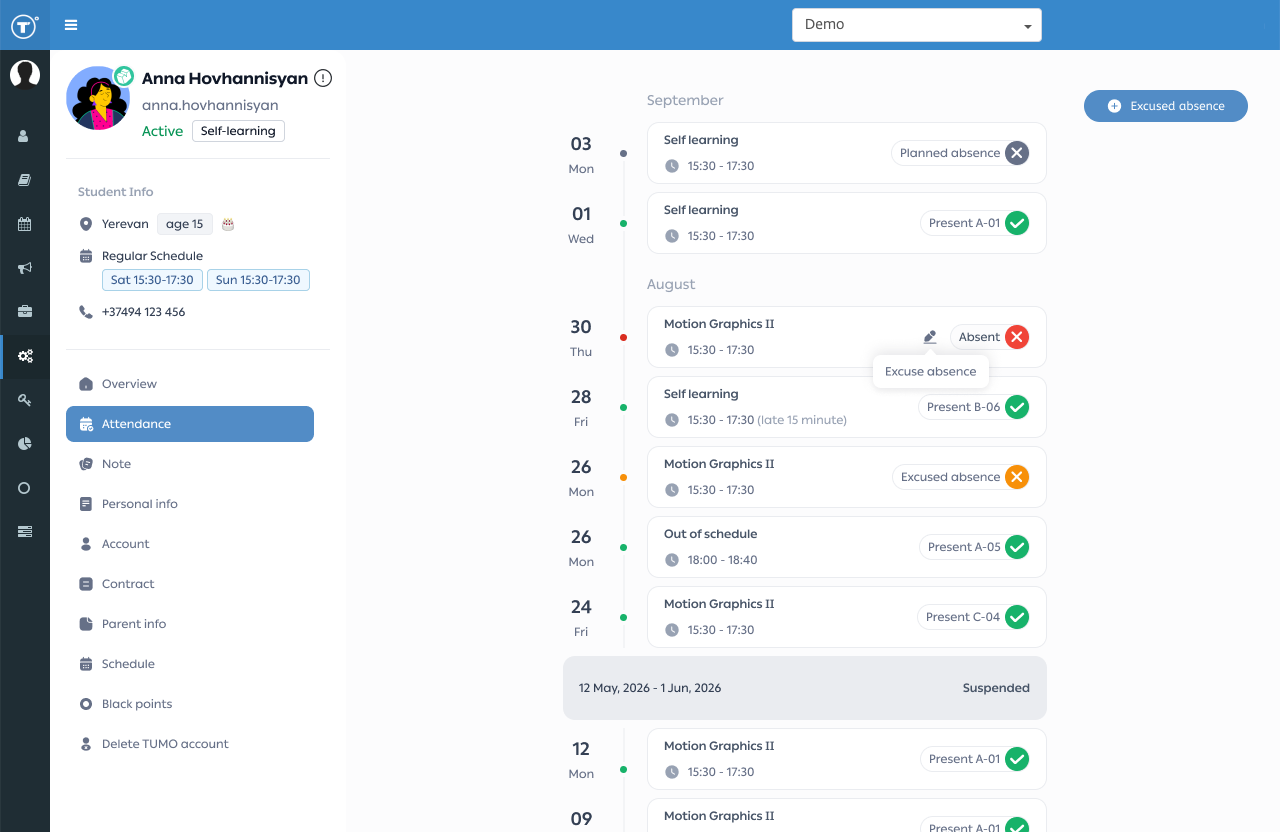
A new Attendance page replaces the previous one. It shows a student’s attendance history as a clear monthly timeline and lets staff manage excused absences directly on the page.
- Records are grouped by month and year, newest first.
- Each record shows its session type (self-learning, event or one-time session) and a labeled status.
- Lateness appears next to the session time.
- Present records show the student’s workstation (TUMO extension number).
- The average attendance card shows the student’s attendance overall and for the last 3 months.
- Vacation periods appear as Suspended entries.
- Excused absences can be added for future sessions or set on existing absences.
- Hovering over an excused absence shows who added it, when, and why.
AI Colearner
This month focused on keeping activities moving. Chats recover after dropped connections, pictures appear reliably, and Coach and Colo behave more like a good guide and classmate.
- Steadier chats: replies no longer come back empty or vanish after a dropped connection, a saved reply shows instead of an error, and learners can keep typing while Coach answers. Failed group chat messages can be retried.
- Pictures that show up: images no longer get stuck on a placeholder or appear as broken links, and a chat keeps answering after a picture is drawn or blocked.
- Coach sticks to the activity: Coach no longer ends an activity early, rewrites content the activity already set up, or says something was unlocked when it wasn't. Coach also holds back nudges while a learner is typing or tapping in a workspace.
- A more natural Colo: Colo types and moves the cursor like a person in shared workspaces, and long messages no longer make Colo look frozen.
- Smaller fixes: dictation transcribes as you speak, code ending in a comment runs, browser auto-translate no longer changes the app's text, Georgian messages from Coach no longer contain Armenian words, and the chatbot-building activity now names the button that unlocks the knowledge base and gives the shortcut for the learner's computer.
Coach Tool: Enhanced Filtering and History Export Options
The Coach Tool list view has been enhanced with multi-select filtering by coaches and available sessions, making it easier to find relevant students in one place. The History table now supports exports to CSV and Google Sheets. “Upcoming Event” follow-up tasks automatically close when the linked event is deleted or the student is dropped from overbooking.
September 2026
Coach Tool: More Student Context and Additional Information in Card View and List View
The New Coach Tool received several updates, bringing more student information into the main views and making follow-up tasks easier to manage.
- Special needs information is now visible directly on the student Card and in List View.
- Continuous absences are visually highlighted to make follow-up easier.
- Student birthdays are shown with a 🎂 cake icon in both Card View and List View, with the exact date displayed on hover.
- List View now includes a Portfolio column for quicker access to student portfolios.
- Previous Event Status also shows feedback details on hover, providing additional context without adding clutter to the view.
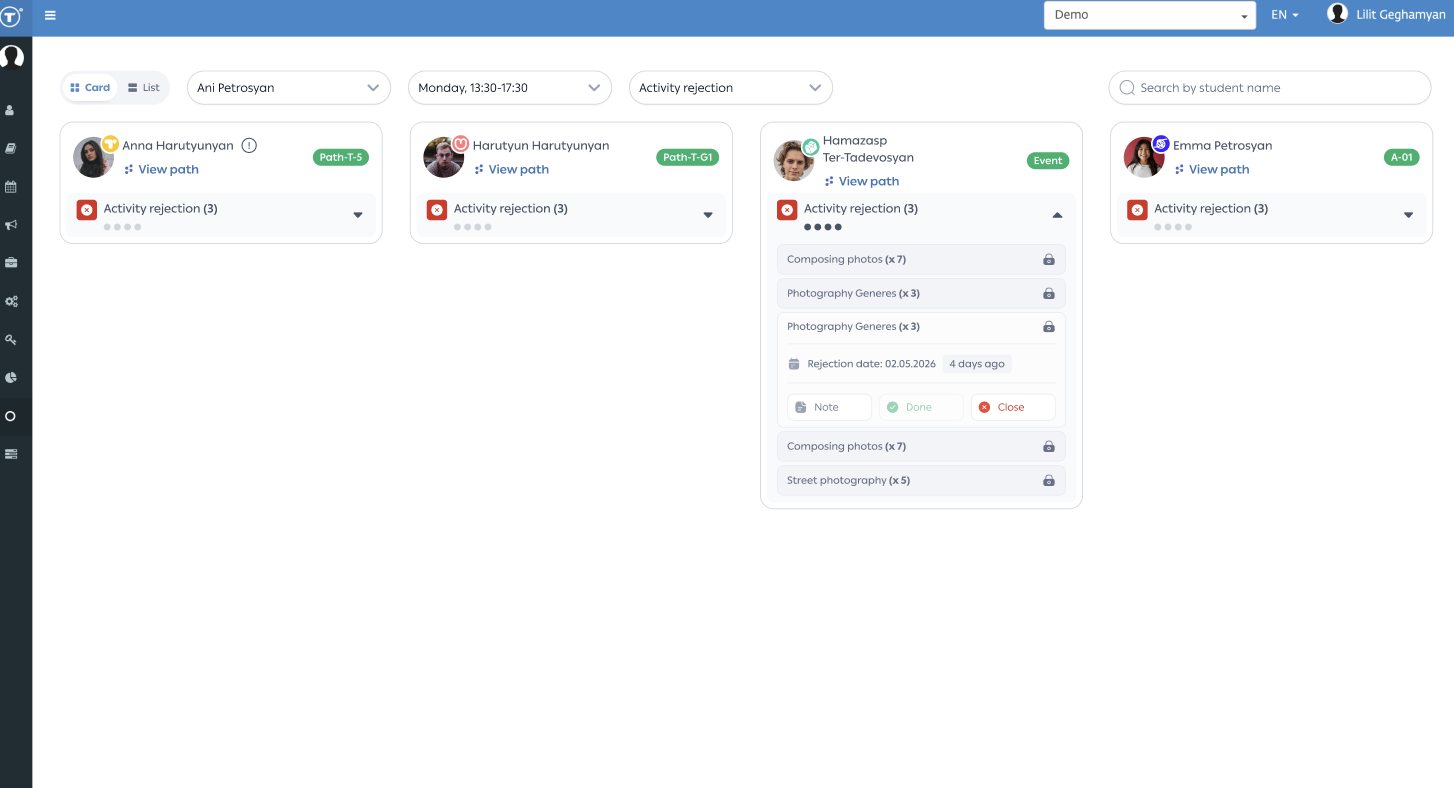
- Card: Rejected activities for a student are now grouped into a single “Rejected activities (N)” task instead of appearing as separate cards. This reduces clutter while still allowing each activity to be expanded and actioned individually.
- History table: A new “Details” column has been added to the History table, providing more context around tasks.
- List View now allows multiple sessions to be selected at once, making it easier to manage several sessions together.
\
TUMO Partner API
The TUMO Partner API is now available, providing partners and internal systems with programmatic access to essential student data. The API currently supports creating student records and pulling essential student data, with additional capabilities to follow.
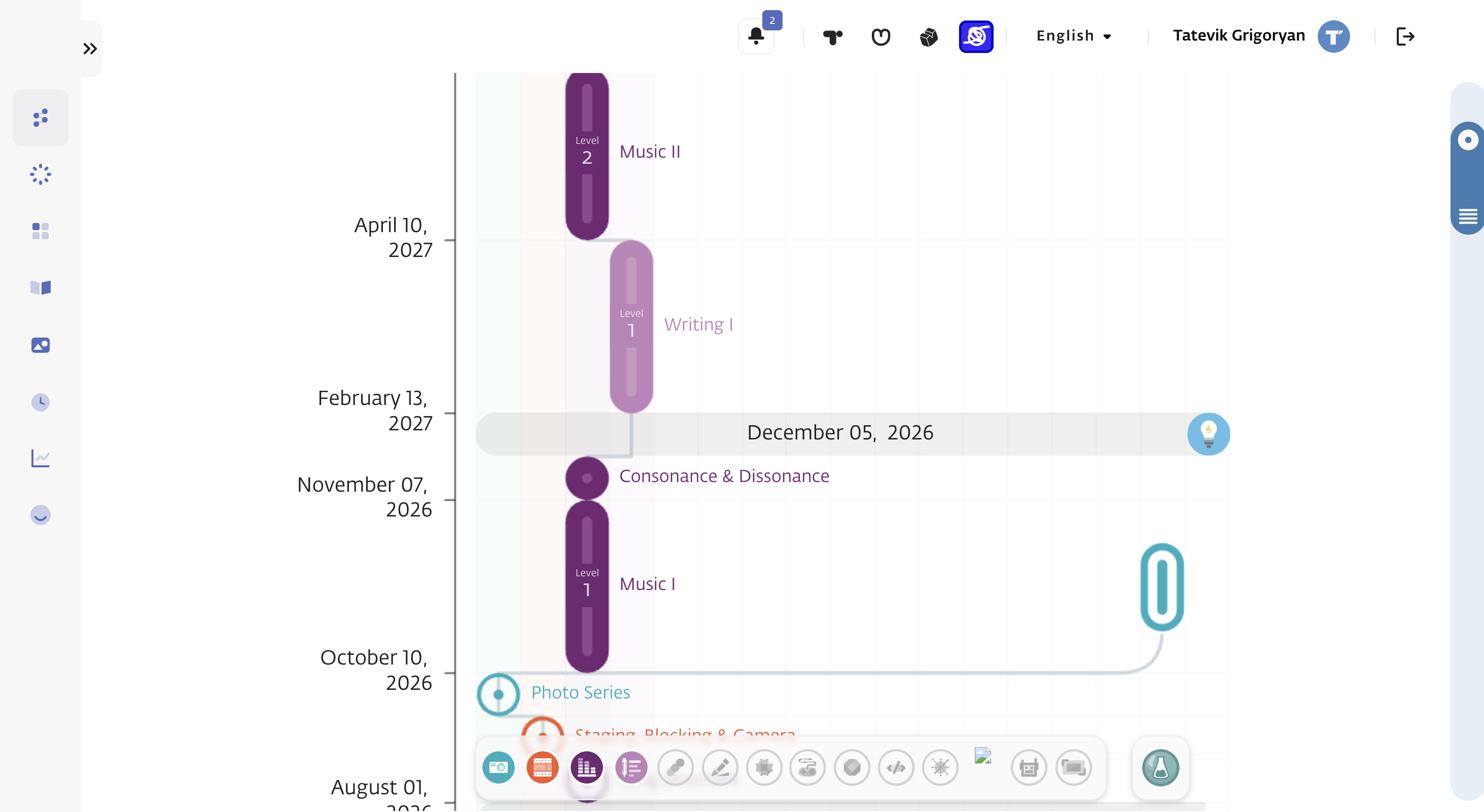
Path Visual Refresh in TUMO World. Alternative workshop icon redesign
- New color palette, typography, background, and icons for workshops and activities, with an updated line connecting them.
- Timeline dates are shown smaller, in grey, and on a single line. The year is shown only when it changes, and today's date is in bold.
- The skill row, the workshop information shown on hover, and the activity section under Review, Examining, and Pending have a new design.
- Alternative workshops are marked with pill-shaped icons in the skill's color, replacing the colored sticks. Hovering over an icon shows the workshop information.

New Skills chart on the Student Overview page
The Student Overview page in T360 now shows the student's skills as a chart, replacing the previous skills cards. Three summary cards at the top show the number of completed self-learning activities (total and for the last 3 months), completed workshops, and completed learning labs. The chart shows each skill with the number of self-learning activities completed, workshops completed, upcoming workshops, and learning labs. Current skills are highlighted in full color. Skills where the student has completed a workshop or learning lab but isn't currently active are shown with a colored icon on a light background. Skills with no completed workshops or learning labs are shown in grey. The date of the last data update is shown in the top right corner of the section.

See the related knowledge-base article: Student Profile → Overview
AI Colearner
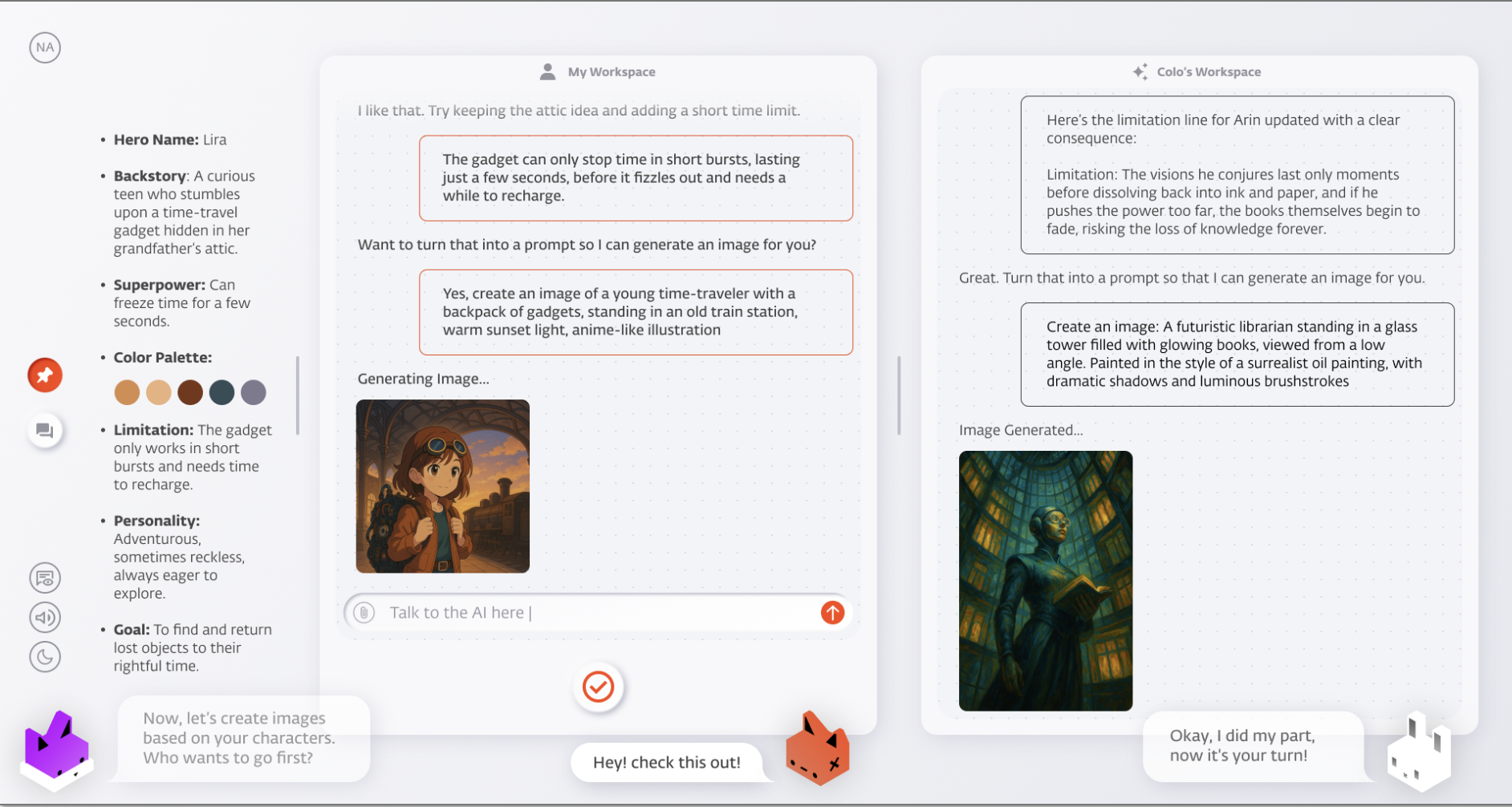
A new way to do self-learning at TUMO. Instead of an AI tutor, every student now gets an AI colearner: a peer that learns alongside them, adapts to their pace, and supports 11 languages across the network, making self-learning more engaging and personalized. After a pilot across 10+ international centers and months of use in Yerevan, the Colearner is now rolling out to the wider network.
New GenAI Skill Area
GenAI joins TUMO as a new skill area, giving students hands-on experience with AI: prompting, context, multimodality, and more, culminating in a Level 1 workshop where they build their own AI character. Its self-learning activities are powered by the AI Colearner, so students build alongside their AI peer. The goal is to help teens become active builders in the AI era, not just passive consumers.
Path: Workshop Overbooking
Path now lets more students subscribe to a workshop than its capacity while they're still completing the prerequisites. This gives more students the opportunity to complete the required prerequisites and secure a spot, while available places are ultimately awarded to those who complete the prerequisites first. Already available in Armenia for several sessions; now rolling out to all sessions and network-wide.
Workshop Info Modal Redesign
The workshop info modal has been redesigned. It now holds the workshop availability information alongside the prerequisites and the session details, so a student can see in one place how full the workshop is, what is left to complete, and when it runs.
See the related knowledge base article .
Learning Labs and Permanent Workshops in Parallel
Students can now participate in a learning lab and a permanent workshop at the same time, as long as the sessions don't overlap. Conflicts are checked session by session rather than across the whole date range, and back-to-back sessions don't count as an overlap. Where sessions do overlap, the existing rules still apply.
Labs and permanent workshops scheduled at different times of day no longer compete for the same students, so students fit more into the same period and fewer spots go unfilled.
T.U.M.O. Phases
The T.U.M.O. phases are coming to every center. For students, they give a structured and transparent view of the learning journey: where they stand now, what milestones they've reached, and what comes next. For centers, they're a common language to talk about students at each stage, tailor support to what each phase needs, and celebrate milestones as students advance. Already live in LA, Paris, and Berlin and integrated across T360, TUMO World, and Portfolio — now rolling out network-wide.
T360 List Views Rebuilt on the New Table
The Student, Staff, and Event lists now share a single table component. The layout is cleaner and easier to scan, and new columns can be added without crowding the view.
- Each user chooses which columns are visible, and can reorder and pin them
- Bulk actions run on the rows selected in the list, for roles with permission, with confirmation and validation before each action applies. Self-learning schedule updates and emails can now be sent in bulk from the Student list
- Roles with export permission can export the Student list with the fields and file type they choose
Redesigned the T360 Student Profile Overview, Notes & Account pages
The Overview page has been redesigned to give a clearer view of student information. Notes can now be filtered, sorted, and pinned for easier management, and the Account, Google account, Delete TUMO account, and Contract pages have been consolidated into a single Account page.
For detailed information about each redesign, see the related knowledge-base articles:
Workshop Manager
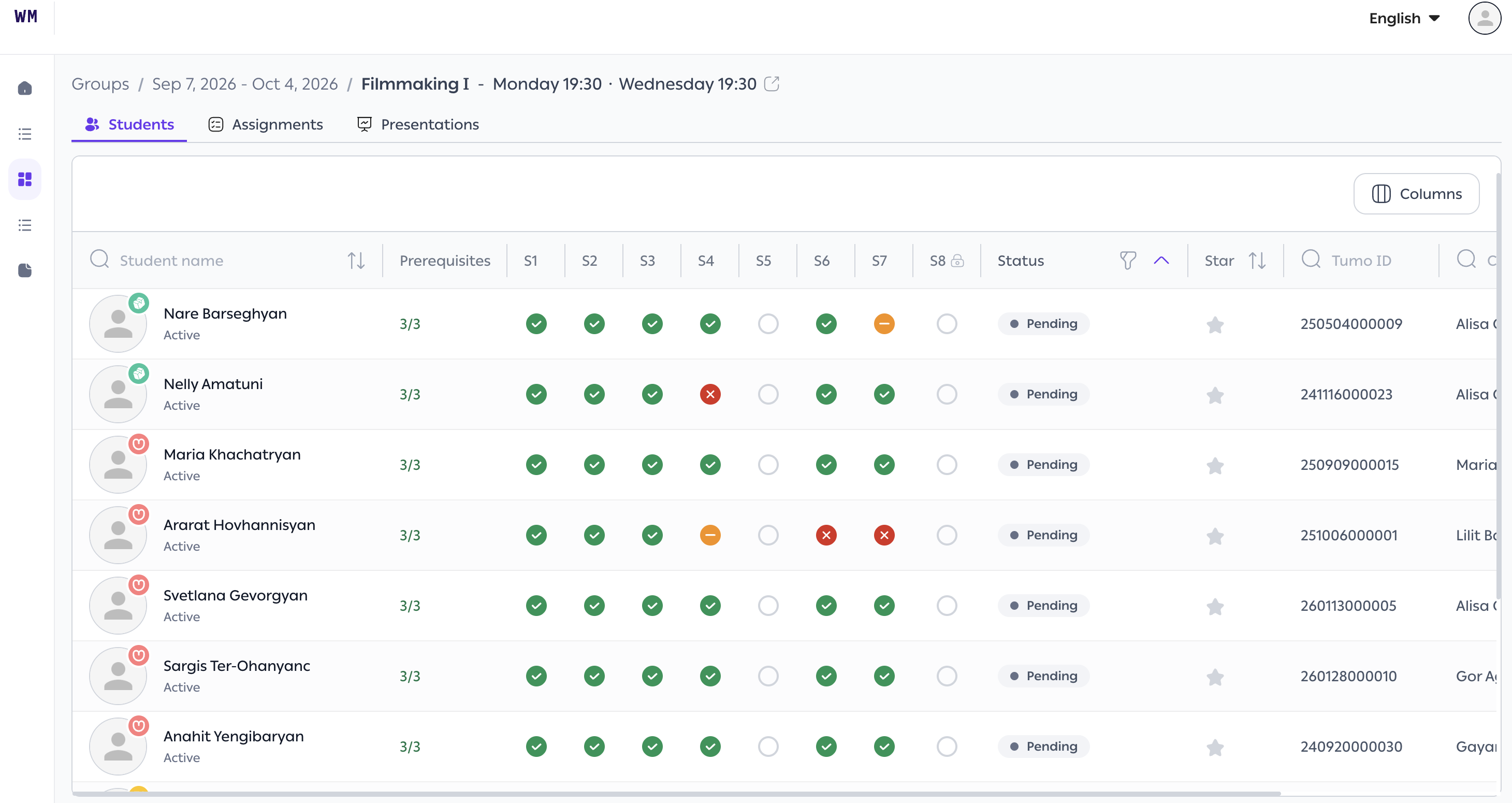
The next generation of how workshops are run at TUMO, rebuilt from the ground up. Workshop leaders get far smoother grading and feedback (PDF previews on the grading page, expandable images with keyboard nav, evaluation that respects your filters and sorting); students get a redesigned assignments experience with conveniences like downloading all files at once. Fully multilingual, so it works across the whole network - all Armenian centers move to it this workshop cycle, with international centers following.
August 2026
New Coach Tool
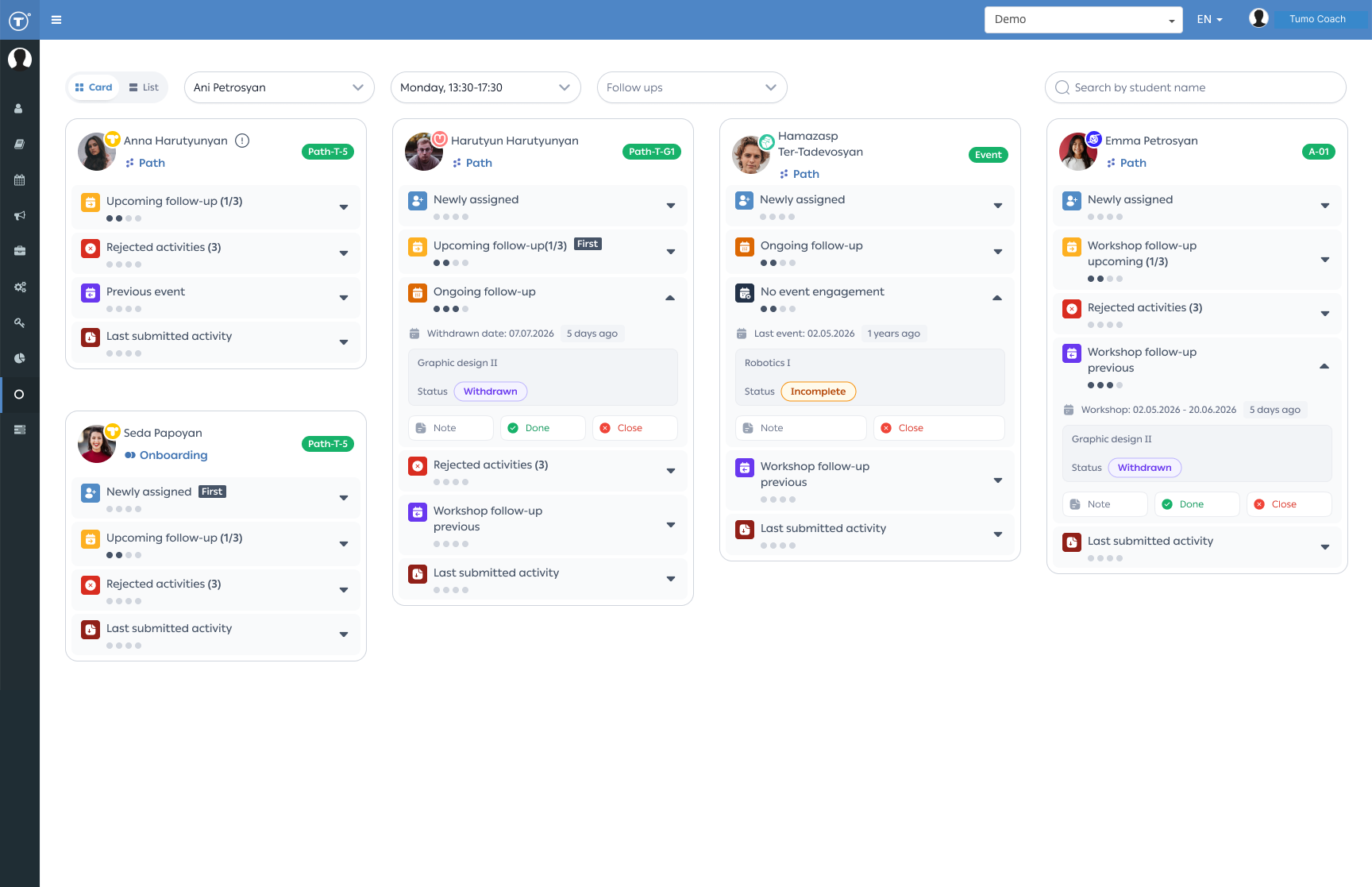
The Coach Tool has been redesigned to give coaches a more organized, efficient way to manage student follow-ups. This release introduces a redesigned Table View and a new Card View, bringing key follow-up information and actions into one place.
- Automated Card View — follow-up cards are prioritized by student activity and the actions needed: newly assigned students, rejected activities, upcoming/previous/ongoing workshops, and last submitted activities.
- Real-time updates — the tool automatically reflects the latest student information, so coaches always have up-to-date data.
- Follow-up history & notes — review previous follow-up actions, add notes, and keep important context about student interactions in one place.
- Enhanced Table View — the student list has been redesigned with an improved interface for easier navigation and follow-up management.
For detailed information, see the Coach Tool knowledge base article .
June 2026
T360 Student Profile Pages Redesign
Several T360 pages have been redesigned and rebuilt on a new technical foundation, including Student Profile Personal Info, Parent/Guardian Info, Schedule, and Self-Learning Schedule Management. These updates improve usability, consistency, and performance while providing a stronger foundation for future enhancements.
For detailed information about each redesign, see the related knowledge-base articles:
Self-Learning Schedule Management Redesign and Enhancements
We've redesigned Self-Learning Schedule Management to provide a more intuitive and flexible scheduling experience. The update introduces self-learning session pairing, improved session-creation workflows, bulk session creation, enhanced capacity management, and a new weekly schedule view — all built on a modern technology foundation that improves usability and supports future enhancements.\

See the knowledge base article .
May 2026
Learning Labs Administration & Student Experience Updates
This release introduces several improvements to Learning Lab management and the student lab-booking experience.
- Learning Labs can now be associated with multiple skills, making it easier to represent cross-disciplinary labs while ensuring they appear correctly in booking filters and student portfolios.
- Support for special topics — centers can now create Learning Labs that fall outside TUMO's standard skill areas, making it easier to offer special-topic workshops, experimental programs, and other unique learning opportunities.
- Students are now notified when a Learning Lab is rescheduled or canceled. Event-cancellation workflows have also been streamlined, making it easier to notify participants and clear existing subscriptions when needed.
- The booking page now includes a month filter to help students find labs running during a specific period, and students receive a warning when applying for a lab they've already completed, reducing accidental re-enrollments.
April 2026
Online Registration Improvements
We've introduced several improvements to the Online Registration experience to make the application process clearer and easier to complete.
- Moved the age-verification step earlier in the registration flow so applicants can confirm eligibility before completing the application.
- Improved the Identification step by letting applicants select their identification method (Passport, Birth Certificate, or Other), with fields and document requirements updating dynamically based on the selection.
- Added camera-capture support for identification documents on supported devices, making document submission faster and easier.

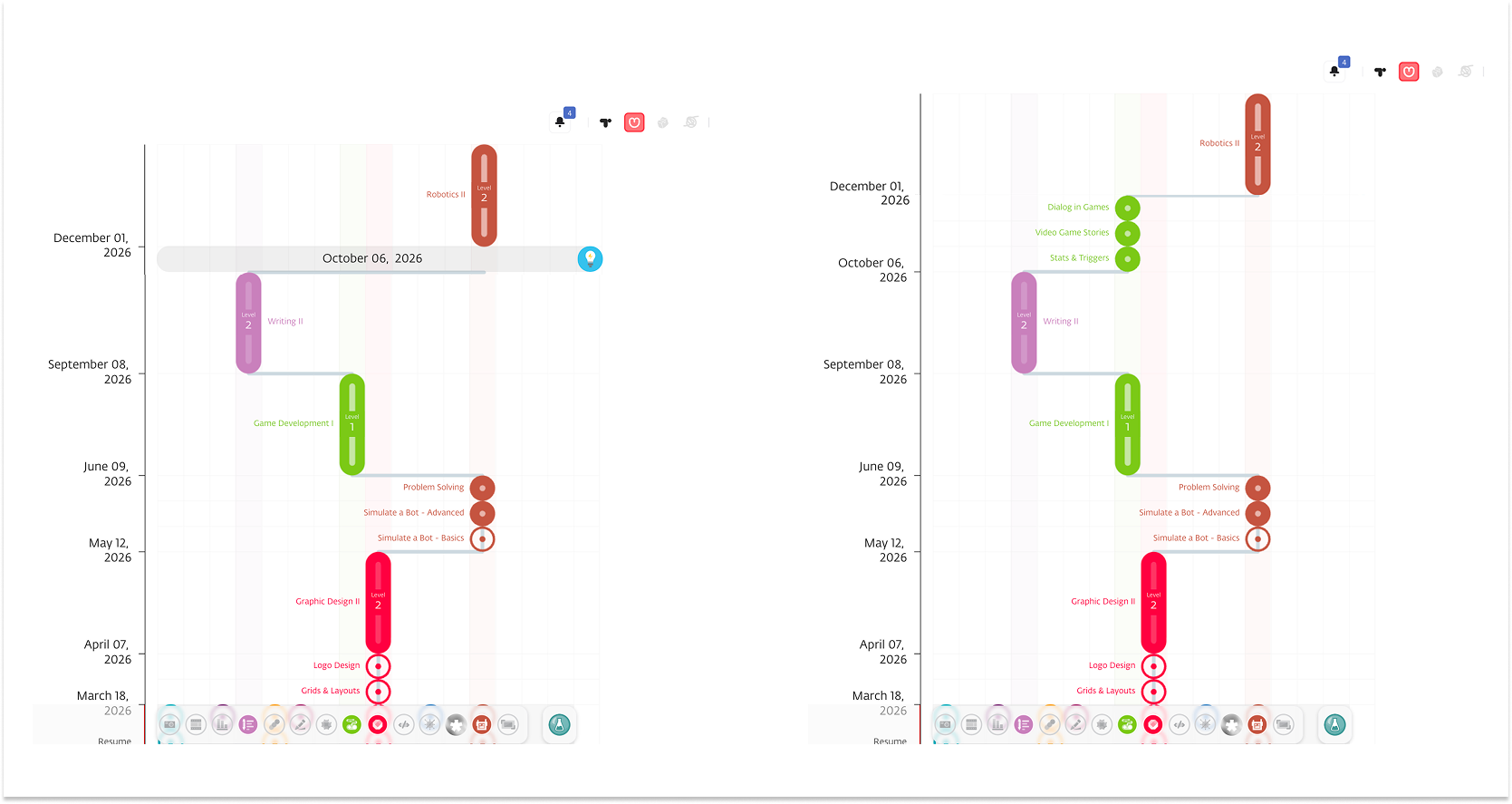
TUMO Path Optimization: Earlier Access to Prerequisite Activities
Students can now see prerequisite activities for workshops related to their selected skills, even before they're subscribed to those workshops. This helps students complete requirements in advance, prepare for upcoming workshops, and make better use of available learning opportunities in their Path.
March 2026
Introducing Coach Tool 🌟
The Coach Tool is a feature-rich addition to our educational product, designed to facilitate seamless communication and provide valuable insights for both coaches and students. Coaches can use it to efficiently organize and manage their follow-ups with students.
See the knowledge base article .